Skip to content
SearchUp Lab Docs
  • Home
  • About
  • Services
  • Contact
Submit a ticket
Submit a ticket
SearchUp Lab Docs
  • Home
  • About
  • Services
  • Contact

Getting Started

3
  • What Is SearchUp Lab?
  • How To Set Up Projects In SearchUp Lab
  • How to Delete a Project

Rank Tracking

1
  • How to Add Search Keywords to Your Project

AI SEO Insights

1
  • How to Add AI Keywords to Your Project
View Categories
  • Home
  • Docs
  • Getting Started
  • How to Delete a Project

How to Delete a Project

< 1 min read

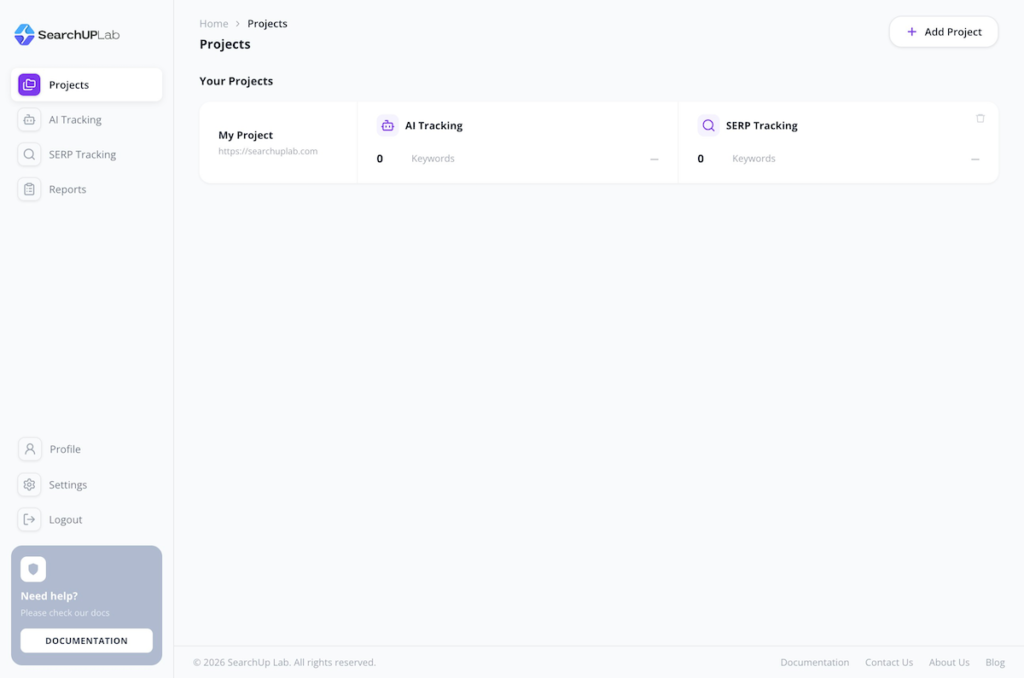
Open Project from sidebar menu.

Click on the bin or trash icon in front of the project you want to delete.

delete-project-searchup-lab

And your project will be deleted.

Updated on September 13, 2026

What are your Feelings

  • Happy
  • Normal
  • Sad
Share This Article :
  • Facebook
  • X
  • LinkedIn
  • Pinterest
How To Set Up Projects In SearchUp LabWhat Is SearchUp Lab?

SearchUp Lab, an AI SEO rank tracking tool for all marketers, small businesses, and marketing agencies.

Company

  • Home
  • About
  • Services
  • Contact

Business

  • Project
  • Our Team
  • Facts
  • Customers

Get In Touch

Rt. 66, Downtown, Washington, DC
info@example.com​
1-800-1234-567
+001 987-654-3210

Copyright © 2026 SearchUp Lab